Parking
Parking at Rutgers takes two separate steps, and the second one is less intuitive. First you register for a parking permit, which is what allows you to park. Then, if the lot you want is gated, you request a physical keycard, because the permit alone will not open the gate. This page covers both, in that order.
Who needs a permit
Everyone. A Rutgers permit is required to park in any Rutgers-owned or leased lot or deck, and your license plate has to be registered to that permit. The permit is virtual, so there is no hangtag or sticker; enforcement reads your plate. Park your plate facing the driving aisle, and if your state issues only a rear plate, do not back into the space.
If you drive more than one car, you can add several plates to a single permit. Only one of those vehicles may be on campus at a time. Rental and loaner cars need to be added too, and temporary tags are registered as the temporary plate number, then updated once the permanent plates arrive.
What it costs
| Who you are | Permit fee |
|---|---|
| Full-time faculty and staff (Class 1 and 3), and TA/GA (Class 6) | Salary-based. Run your own number in the Rutgers parking permit fee calculator. |
| Part-time lecturers (Class 7), co-adjuncts (Class 8), and fellows (Class 9) | Set by the labor agreement rather than salary. These permits run on the academic year, September through August, instead of the fiscal year. |
| Temporary faculty and staff (Class 4) | $10 per month or $100 per year, plus tax. |
| Daily permits | Employees may buy up to 10 per fiscal year from the parking portal. |
| Common lot keycard | $15. Replacements are also $15, and a replacement New Brunswick Parking Authority deck card is $25. |
Full-time employees can spread the cost over the year through pre-tax payroll deduction, which divides the annual cost across 26 pay periods. The alternative is paying up front by credit or debit card.
How to register for a permit
- Go to go.rutgers.edu/parking, which takes you to the parking portal at parkingbase.com/c/rutgers/login, and sign in with your NetID.
- Settle any open citations first. An unpaid citation will stop the purchase from going through.
- Add your vehicle: license plate number, state, make, and color.
- Choose your permit and register the vehicle to it.
- Pick a payment method, either pre-tax payroll deduction or a credit or debit card, and finish the checkout.
New to Rutgers and not in the payroll system yet? Your hiring department can request a temporary permit on your behalf through the Vehicle Registration Form for New Employee in DOTS Help. In Mason Gross Music, ask the Business Office to submit it rather than waiting for your own account to activate.
Renewing each year
Permits for full-time, 12-month employees paying by payroll deduction renew automatically on July 1. Automatically is not the same as reliably, so log into the parking portal after July 1 and confirm the new permit is actually showing on your account. If it is not there, open a case at dotshelp.rutgers.edu. Everyone else, including part-time lecturers and co-adjuncts on the September to August cycle, registers again rather than renewing.
Getting a keycard for a gated lot
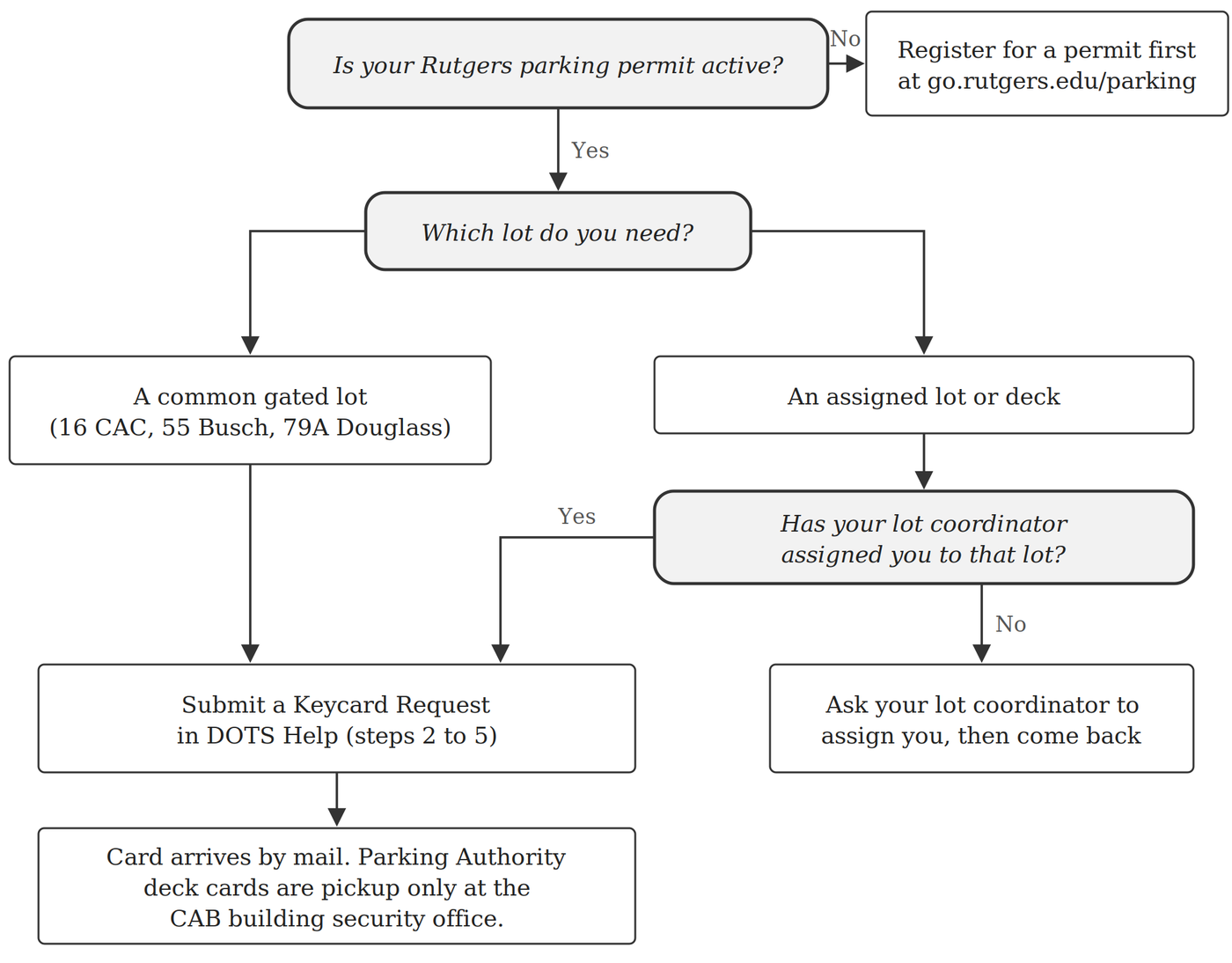
A permit lets you park in a lot, but it does not open the gate. The gated lots in New Brunswick, both the common lots and the assigned ones, need a physical keycard. You request that card online through DOTS Help (the Department of Transportation Services help site). Once you know where the form is, the whole thing takes about five minutes.
- You need an active faculty or staff permit before requesting a card.
- For an assigned lot or deck, your lot coordinator has to assign you to that lot before DOTS will issue a card for it. The common gated lots (16 CAC, 55 Busch, and 79A Douglass) do not need an assignment.
- Have the mailing address ready where you want the card sent. Cards are mailed, with one exception covered in step 4.
Which path applies to you
Step 1. Confirm your permit is active
Go to go.rutgers.edu/parking, click Sign In Rutgers SSO, and log in with your NetID.

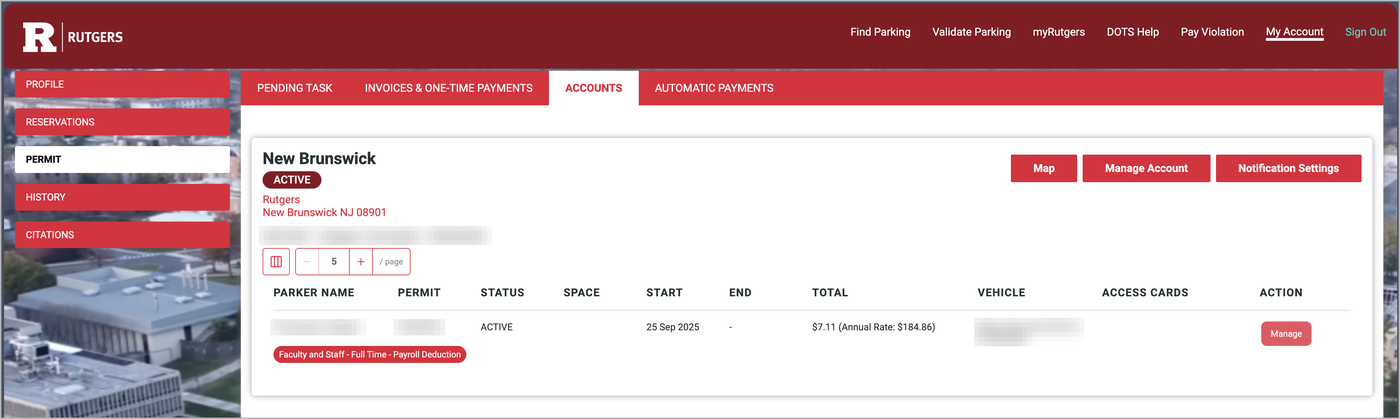
Click My Account, then Permit on the left. Your permit should show a status of Active. If it does not, sort that out before requesting a card, because the keycard is tied to the permit.
Step 2. Open DOTS Help and log in
Go to dotshelp.rutgers.edu, or click DOTS Help in the parking portal menu. Before doing anything else, click Log in with NetID in the top right corner. DOTS says NetID login gives the fastest service, and you need to be logged in to track your request later.

Step 3. Find the Keycard Request form
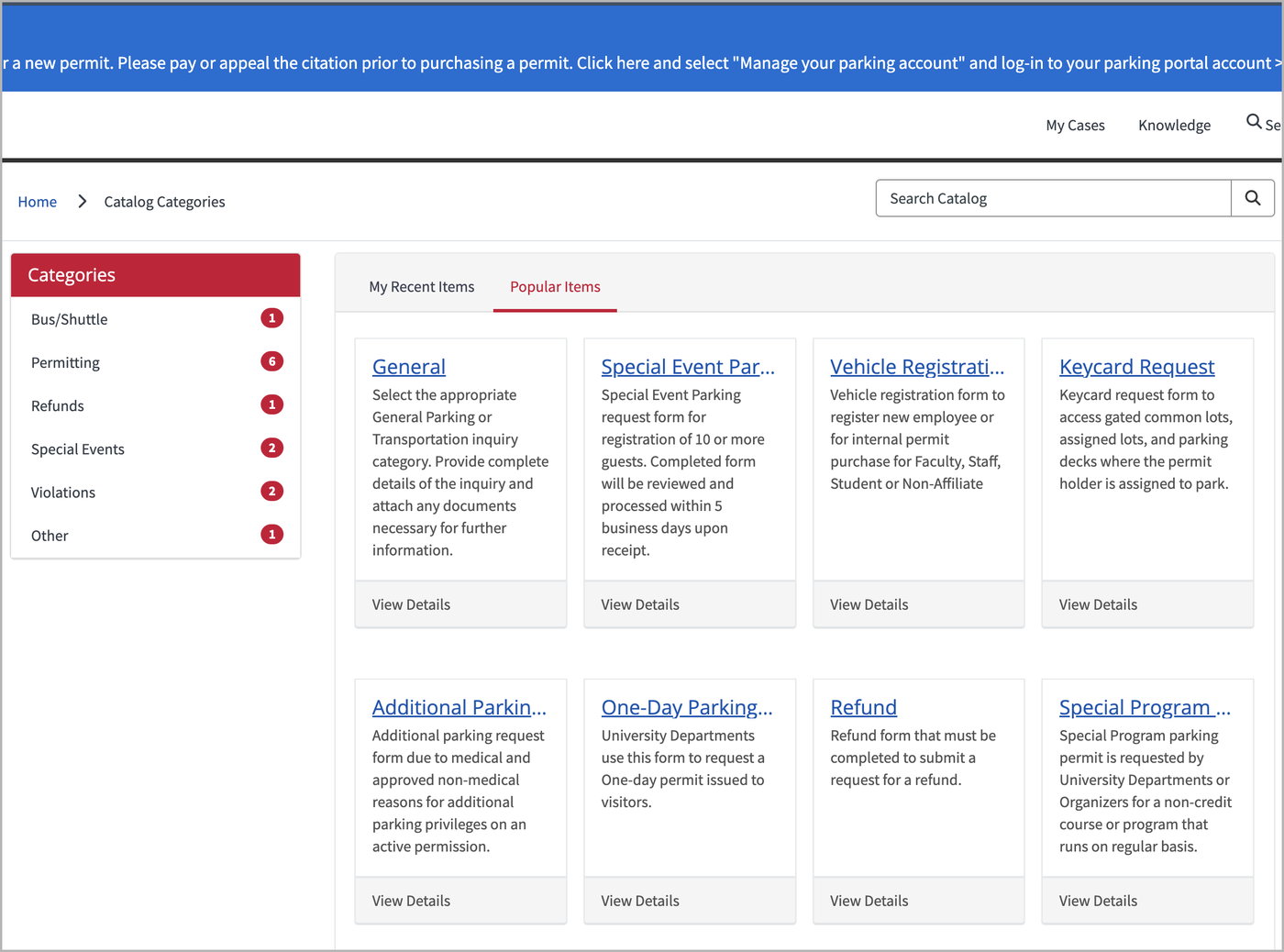
Once you are logged in, click Request Forms. Under Popular Items, click Keycard Request. If you do not see it, type keycard into the Search Catalog box.
Step 4. Fill out the form
Every field with a red asterisk is required. The red tags under Required information, on the right side of the page, show what is still missing. They disappear as you fill things in.
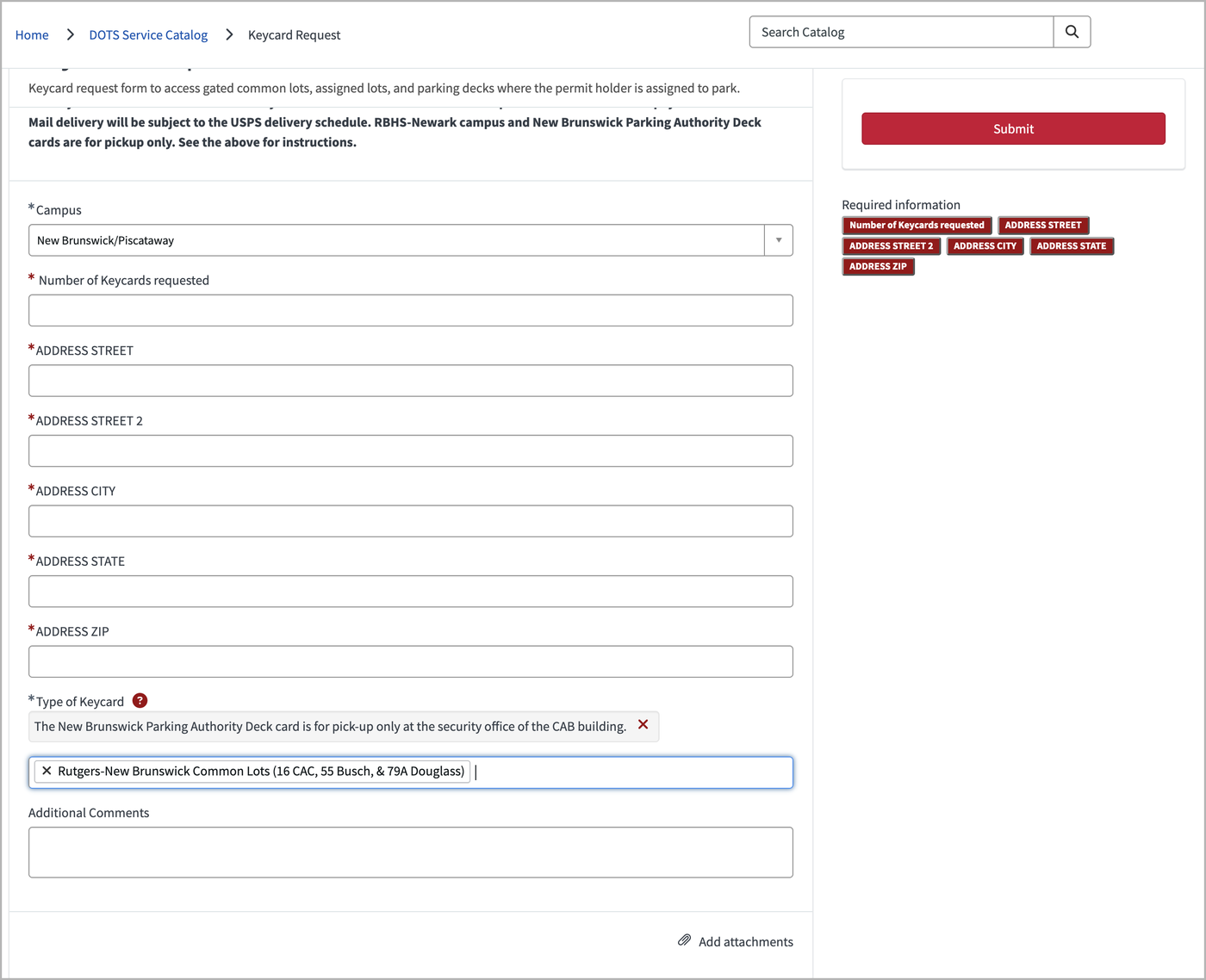
| Field | What to enter |
|---|---|
| Campus | The campus where the lot is. For most Mason Gross staff this is New Brunswick/Piscataway. |
| Number of Keycards requested | How many cards you need, one card per lot type. Someone who needs an assigned lot and the common lots enters 2. |
| Address (street, city, state, zip) | Where the card should be mailed. The form marks Address Street 2 as required, so if you have no second line, type N/A. |
| Type of Keycard | Pick the lot or lots from the list. The common lots appear as “Rutgers-New Brunswick Common Lots (16 CAC, 55 Busch, & 79A Douglass).” |
| Additional Comments | Optional, but use it whenever you ask for more than one card. Name each lot so there is no guesswork on the DOTS side. |
Asking for two cards? Say exactly what each one is for in Additional Comments. For example: I need two cards. One for lot 73, and one for the common lots.
New Brunswick Parking Authority deck cards (and RBHS-Newark cards) are not mailed. They are pickup only, at the security office in the CAB building, 125 Paterson Street.
Step 5. Submit and keep your case number
Click Submit. You land on your case page, which shows a case number starting with PAR, the status New, and your request in the activity feed. DOTS also emails you a confirmation.

Write the case number down. Any questions from DOTS will come back by email, and you can reply or add details by typing in the message box on the case page and clicking Send. To find the case again later, log in to DOTS Help and click My Cases.
When something goes wrong
You cannot buy a permit because of an open citation
Unpaid or open citations block a permit purchase outright. Pay or appeal the citation in the parking portal under Citations, then start the registration again.
The Submit button on the keycard form will not go through
Look at the red tags under Required information. Each one is a field that is still empty. Address Street 2 is the usual culprit; type N/A if you do not have a second address line.
Your assigned lot is not in the Type of Keycard list
That usually means you have not been assigned to the lot yet. Contact your lot coordinator, get the assignment made, and then submit the request.
A blue “Open Citations” banner is showing in DOTS Help
This banner appears at the top of DOTS Help even when your account is in good standing, so it does not necessarily mean you owe anything. Check the Citations page in the parking portal to see whether you actually have one.
You cannot log in with your NetID
New NetIDs can take up to two business days to show up in the parking system. University Hospital employees, alumni, and guests should email dotshelp@rutgers.edu instead of using the form.
You are new and your appointment is not in the system yet
Your hiring department can request a temporary permit for you using the Vehicle Registration Form for New Employee in DOTS Help. For Mason Gross Music, ask the Business Office to submit it.
You submitted the wrong thing
Do not file a second request. Open the original case from My Cases and add a correction in the message box so DOTS sees everything in one place.
It has been a while and no card has arrived
Mailed cards move on the USPS schedule, so allow some time. After that, post a short follow-up in your case rather than calling, since the case keeps the whole history together.
Permit fees, payment options, and gated lot rules on this page come from the Rutgers IP&O Faculty/Staff Parking Permits page and the Faculty and Staff Parking FAQ, checked September 2026. Fees change by fiscal year, so confirm current numbers before budgeting.