Header Settings
The Header Settings section of the Customizer allows you to choose between three colors (white, gray, and red), the option to add a Button to your site’s header, and several school-specific styles for display in your site’s header at the top of every page.
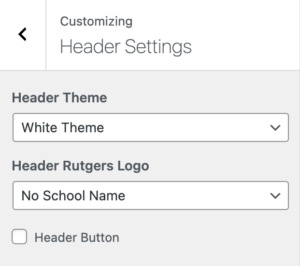
If your unit’s logo is not listed below, feel free to contact the Sites@Rutgers Team with suggestions and they will be taken into consideration.
-
White Header

Red Header

Gray Header

-
No School Name
Edward J. Bloustein School of Planning and Public Policy

Graduate School of Applied and Professional Psychology

Graduate School of Education

Mason Gross School of the Arts

Rutgers Business School – Newark and New Brunswick

School of Arts and Sciences

School of Communication and Information

School of Engineering

School of Environmental and Biological Sciences

School of Graduate Studies

School of Management and Labor Relations

School of Social Work

Graduate School – Newark

Rutgers Law School

School of Arts and Sciences-Newark

School of Criminal Justice

School of Public Affairs and Administration

Camden College of Arts and Sciences

Graduate School-Camden

School of Business-Camden

School of Nursing-Camden

Ernest Mario School of Pharmacy

New Jersey Medical School

Robert Wood Johnson Medical School

Rutgers School of Dental Medicine

School of Health Professions

School of Nursing (Newark and New Brunswick)

School of Public Health

Rutgers University-New Brunswick

Rutgers University-Newark

Rutgers University-Camden

Rutgers Biomedical and Health Sciences

Rutgers University Libraries

New Jersey Agricultural Experiment Station

-

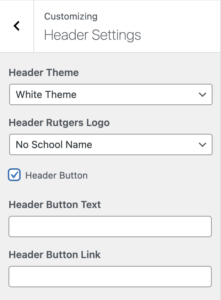
Make sure the “Header Button” option is checked in order to edit the Header Button Text and Header Button Link